5. Global Forecast System (GFS) Configuration
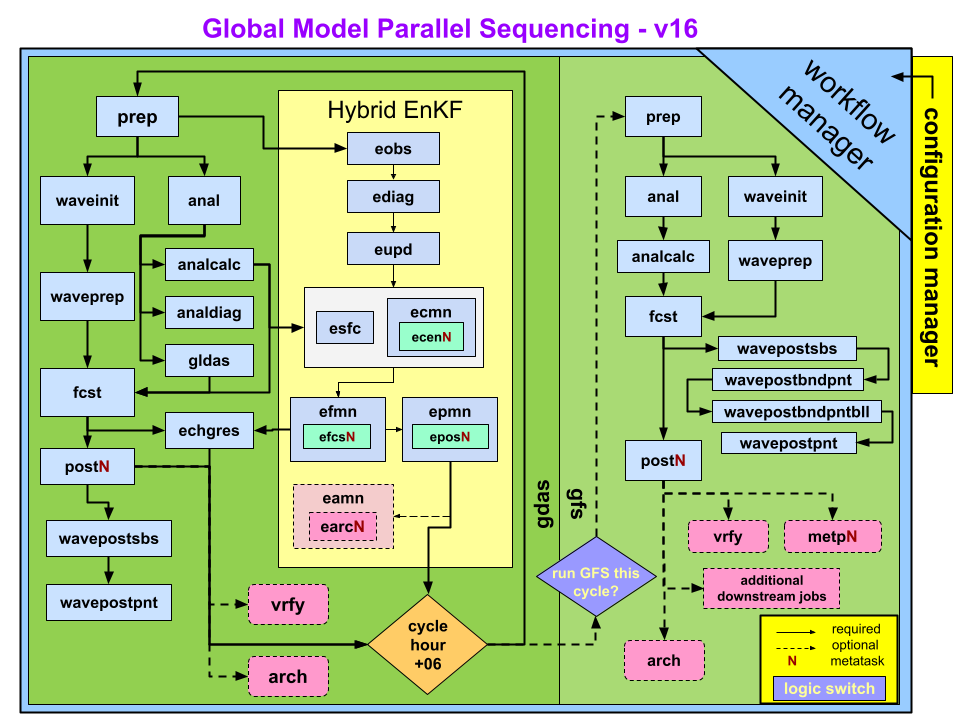
Fig. 5.1 Schematic flow chart for GFS v16 in operations
The sequence of jobs executed in the GFS v16 configuration’s end-to-end workflow covering analysis, forecast, post processing, and verification, is shown in Fig. 5.1. Each of these steps is carried out by a set of workflow scripts.
For each cycle, the system runs two suites:
gdas suite, which provides the initial guess fields
gfs suite, which generates the initial conditions (ICs) and runs the forecast
5.1. Jobs run in the GFS Configuration
The GFS configuration in the GW is organized into a series of jobs that run in a defined sequence for each cycle. These jobs handle everything from preparing input data to running the forecast and generating post processed products. Each job is executed by a workflow manager (Rocoto or ecFlow) and corresponds to a specific script within the workflow. Although the exact list of jobs varies depending on whether you are running gdas, gfs, or a specialized experiment, the major categories of jobs include:
Preprocessing Jobs:
These jobs prepare all required inputs before analysis or forecasting begins and examples include:
prep: prepares observation data
chgres: converts initial conditions to the model grid
fv3ics: generates FV3 initial conditions
sfcprep: prepares surface fields
2. Analysis Jobs (gdas suite): These jobs perform data assimilation to produce the best estimate of the atmosphere at the cycle time and examples include:
gdasanal: runs the GSI or JEDI analysis
enkf: ensemble Kalman filter analysis (if enabled)
updatebc: updates background fields for the next cycle
3. Forecast Jobs (gfs suite): These jobs run the UFS-WM to produce the forecast and these jobs include:
fcst: main forecast model integration
post: post processing of model output
postg: additional post processing for specific grids
4. Post processing Jobs: These jobs generate downstream products used for verification, graphics, or distribution and examples include:
vrfy: verification tasks
awips: AWIPS ready products (not typically run in experiments)
gempak: GEMPAK output (operations only)
5. Archiving and Cleanup Jobs (Experimental Mode Only): These jobs are run only in development mode and examples include:
arch_vrfy: Archives verfication products.
arch_tars: Archives various tarred workflow outputs (e.g., logs, restarts).
cleanup: Removes temporary or intermediate files.
A comprehensive list of jobs run in the GFS configuration is listed in the following table.
JOB NAME |
PURPOSE |
|---|---|
anal |
Runs the analysis. 1) Runs the atmospheric analysis (global_gsi) to produce analysis increments; 2) Update surface guess file via global_cycle to create surface analysis on tiles. |
analcalc |
Adds the analysis increments to previous cycle’s forecasts to produce atmospheric analysis files. Produces surface analysis file on Gaussian grid. |
analdiag |
Creates netCDF diagnostic files containing observation values, innovation (O-F), error, quality control, as well as other analysis-related quantities (cnvstat.tar, radstat.tar, ozstat.tar files). |
arch_vrfy |
Archives select files from the deterministic model and cleans up older data. |
arch_tars |
Optional archive job that backs up the COM data structure. |
globus_arch |
Optional archive job that sends the tarballs generated by arch_tars to HPSS via globus. |
earcN/eamn |
Archival script for EnKF that write selected EnKF output to HPSS or locally |
globus_earcN |
Additional archival script that pushes data to HPSS via Mercury. |
ecenN/ecmn |
Recenter ensemble members around hi-res deterministic analysis. GFS v16 recenters ensemble member analysis. increments. |
echgres |
Runs chgres on full-resolution forecast for EnKF recentering (ecen). |
ediag |
Same as analdiag but for ensemble members. |
efcsN/efmn |
Run 9 hour forecast for each ensemble member. There are 80 ensemble members. Each efcs job sequentially processes 8 ensemble members, so there are 10 efcs jobs in total. |
eobs |
Data selection for EnKF update (eupd). |
eposN/epmn |
Generate ensemble mean atmospheric and surface forecast files. The ensemble spread is also computed for atmospheric forecast files. |
esfc |
Generate ensemble surface analyses on tiles. |
eupd |
Perform EnKF update (i.e., generate ensemble member analyses). |
fcst |
Runs the forecast (with or without one-way waves). |
metpN |
Runs MET/METplus verification via EMC_verif-global. |
prep |
Runs the data preprocessing prior to the analysis (storm relocation if needed and generation of prepbufr file). |
postN |
Runs the post processor. |
waveinit |
Runs wave initialization step. |
waveprep |
Runs wave prep step. |
wavepostsbs |
Runs wave post-processing side-by-side. |
wavepostbndpnt |
Runs wave post-processing for boundary points. |
wavepostbndpntbll |
Runs wave post-processing for boundary points bulletins. |
wavepostpnt |
Runs wave post-processing for points. |
5.2. Experimental vs Operational Runs: A Snapshot
Experimental run is different from operational runs in the following ways:
Note
Experiments can also be run with ecFlow if the platform has an ecFlow server.
Dump step:
Not run in experiments but in real-time production. Dump data already exists in GDA on supported platforms.
Additional steps in experimental mode:
arch_vrfy
arch_tars
cleanup
Note
Downstream production jobs (e.g., AWIPS, GEMPAK) are not included in Fig. 5.1 because these jobs are not normally run in developmental setups.
5.2.1. For New Users
Note
Operational systems include many additional downstream jobs that are not run in development mode.
The workflow manager (ROCOTO or ecFlow) determines job dependencies and ensures each job runs only when its prerequisites are complete.
The exact job list for your experiment is defined in the workflow XML (ROCOTO) or suite definition (ecFlow)